
Účet Kontakt
Váš košík
Doručenie cez DPD a FedEx
Pomoc? Opýtajte sa AI

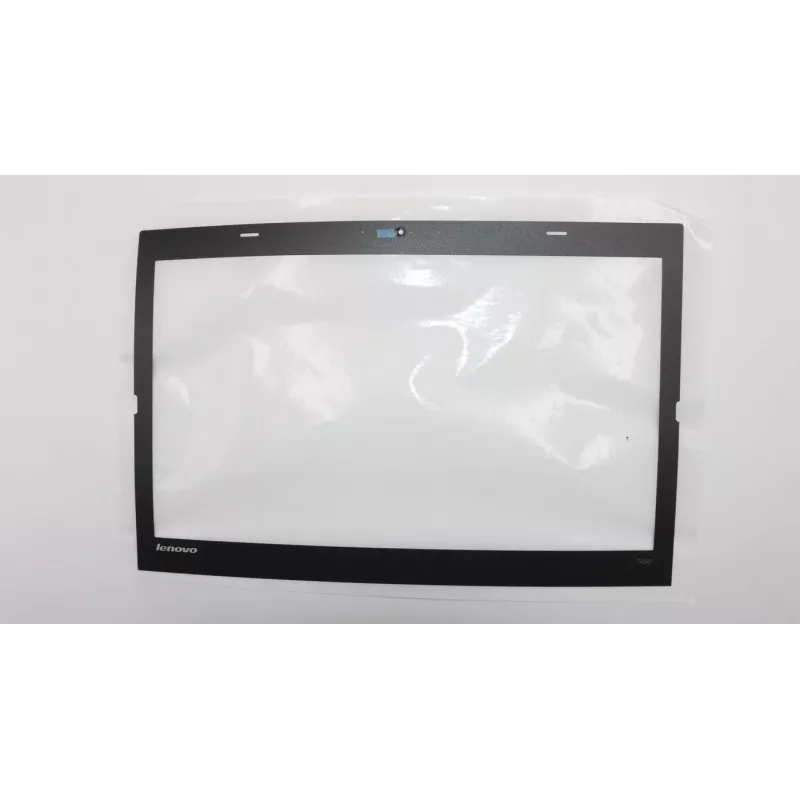
LCD rám Lenovo FRU00HN541 náhradný diel pre notebooky Lenovo

LCD rám Lenovo FRU00HN541 náhradný diel pre notebooky Lenovo
62,49 €
Replacement LCD bezel FRU00HN541 by Lenovo is an exterior frame designed for compatible Lenovo notebook displays. The bezel restores the original appearance of the laptop screen assembly, secures the LCD panel in place, and protects the edges of the display from dust and mechanical stress. It is int... Čítať viac
Sklad Nie je skladomNie je skladom Kód 1529748 Značka LENOVO Model FRU00HN541 Záruka 2 roky

Doprava a vrátenie tovaru

Replacement LCD bezel FRU00HN541 by Lenovo is an exterior frame designed for compatible Lenovo notebook displays. The bezel restores the original appearance of the laptop screen assembly, secures the LCD panel in place, and protects the edges of the display from dust and mechanical stress. It is intended for direct-fit installation on notebooks that accept this frame dimension and mounting layout.

Advantages

The bezel provides a precise fit that maintains correct screen alignment and gap tolerances, preventing display wobble and keeping bezel clips and screw points properly positioned. Made to match Lenovo's original mechanical specifications, it helps preserve the structural integrity of the display assembly and offers a uniform finish that matches the laptop chassis.

Suitable for

  • Repairing damaged or cracked display frames on compatible Lenovo notebooks
  • Refurbishment projects where screen assembly appearance must be restored
  • Maintenance tasks requiring replacement of worn or missing bezel clips

Key specifications

  • Form factor: exterior LCD bezel for notebook display assembly
  • Compatibility: designed for Lenovo notebooks that share the same display dimensions and mounting layout
  • Material: rigid plastic frame engineered for display protection and mounting stability
  • Finish: matte/smooth surface matching typical Lenovo notebook bezels
  • Mounting: clip-and-screw attachment points compatible with original display assembly

How to use

Power off the notebook, remove the battery if possible, and follow the manufacturer service instructions for disassembling the display bezel. Carefully detach the damaged bezel by releasing clips and unscrewing retaining screws, then position the replacement bezel over the LCD panel and align it with the mounting points. Press the bezel gently into place to engage the clips and reinstall any screws to secure the frame. After reassembly, verify screen alignment and that there are no gaps or pressure points on the display surface.

Recommendations

Use appropriate, ESD-safe tools and avoid excessive force when engaging bezel clips. If uncertain about disassembly, consult service documentation or a qualified technician to avoid damage to the LCD panel, webcam module, or flex cables.

Hlavné vlastnosti
  • Repairing damaged or cracked display frames on compatible Lenovo notebooks
  • Refurbishment projects where screen assembly appearance must be restored
  • Maintenance tasks requiring replacement of worn or missing bezel clips
  • Form factor: exterior LCD bezel for notebook display assembly
  • Compatibility: designed for Lenovo notebooks that share the same display dimensions and mounting layout
  • Material: rigid plastic frame engineered for display protection and mounting stability
  • Finish: matte/smooth surface matching typical Lenovo notebook bezels
  • Mounting: clip-and-screw attachment points compatible with original display assembly
Vývoj ceny zatiaľ nie je k dispozícii
Stále zhromažďujeme dostatok denných údajov o cenách tohto produktu.
Predajca: UAB KUR LT · Laisvės pr. 125A, LT-06118 Vilnius, Litva · IČO 303192950 · IČ DPH LT100008198612 · Odoslanie z EÚ (Litva)
Dobrý deň, som AI asistent DistriNode. Pomôžem Vám nájsť produkty, porovnať možnosti, vytvoriť cenovú ponuku v PDF alebo otvoriť požiadavku na podporu.