
Účet Kontakt
Váš košík
Doručenie cez DPD a FedEx
Pomoc? Opýtajte sa AI

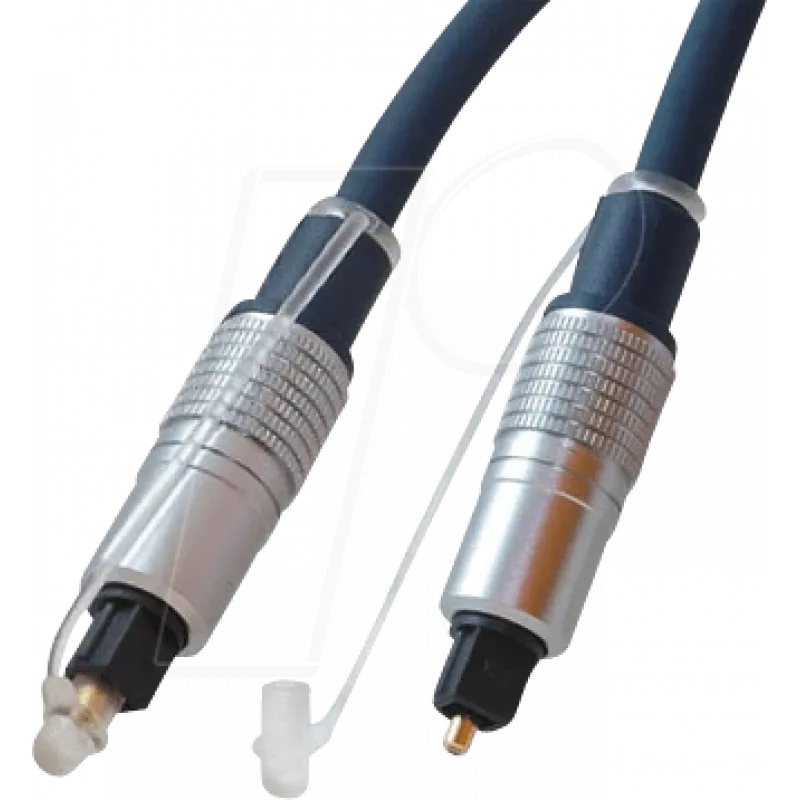
Audio kábel TOSLINK ShiverPeaks SP69006-2.0 2 m modrý

Audio kábel TOSLINK ShiverPeaks SP69006-2.0 2 m modrý
17,56 €
The ShiverPeaks SP69006-2.0 is a 2-meter TOSLINK optical audio cable designed for digital audio connections between devices. This cable features male-to-male TOSLINK connectors with gold-plated contacts to maintain stable signal transfer and reduce wear. The blue outer jacket provides a visible, org... Čítať viac
Sklad 204 Kód 2256176 Značka SHIVERPEAKS Model SP69006-2.0 Záruka 2 roky

Doprava a vrátenie tovaru

Predpokladané doručenie štvrtok, októbra 22
O stave zásielky Vás budeme priebežne informovať prostredníctvom nášho podrobného systému sledovania zásielok
Možnosti platby
Platobná kartaVisaMastercardPayPalApple PayGoogle PayBankový prevod

The ShiverPeaks SP69006-2.0 is a 2-meter TOSLINK optical audio cable designed for digital audio connections between devices. This cable features male-to-male TOSLINK connectors with gold-plated contacts to maintain stable signal transfer and reduce wear. The blue outer jacket provides a visible, organized cable route in home theater and entertainment setups while preserving the integrity of digital audio signals without electromagnetic interference.

Advantages

The cable offers reliable optical signal transmission with low latency and immunity to electrical noise. Gold-plated contacts improve contact reliability and corrosion resistance for longer service life. Its 2 m length balances reach and cable management for typical living room layouts. The colored jacket helps identify connections quickly in multi-cable installations.

Suitable for

  • Connecting TVs to soundbars or AV receivers
  • Linking gaming consoles to audio systems
  • Joining CD players, DACs, or set-top boxes to home audio equipment
  • Temporary or permanent installations in home theater setups

Key specifications

  • Connector type: TOSLINK (optical) male to male
  • Cable length: 2 meters
  • Contact plating: gold-plated contacts for improved durability
  • Outer jacket color: blue
  • Signal type: digital optical audio (PCM, multichannel depending on device support)

How to use

Ensure both source and target devices support TOSLINK optical connections and are powered off before connecting. Align the TOSLINK connector with the optical port and insert gently until it seats; do not force the connector. Power on devices and select the optical input/output in device menus if required. Avoid sharp bends in the cable and keep the optical ends free of dust or debris for optimal performance.

Recommendations

For consistent performance, handle the optical connectors by the housing, keep protective caps on when not in use, and periodically inspect connector ends for dust. Use the 2 m length in setups where the devices are within moderate distance to prevent excess slack and signal path disruption.

Hlavné vlastnosti
  • Connecting TVs to soundbars or AV receivers
  • Linking gaming consoles to audio systems
  • Joining CD players, DACs, or set-top boxes to home audio equipment
  • Temporary or permanent installations in home theater setups
  • Connector type: TOSLINK (optical) male to male
  • Cable length: 2 meters
  • Contact plating: gold-plated contacts for improved durability
  • Outer jacket color: blue
  • Signal type: digital optical audio (PCM, multichannel depending on device support)
Parametre
Dĺžka kábla
2 m
Farba produktu
Blue
Formát konektora 1
Straight
Formát konektora 2
Straight
Konektor 1
TOSLINK
Konektor 2
TOSLINK
Pohlavie konektora 1
Male
Pohlavie konektora 2
Male
Pokovovanie kontaktov konektora
Gold
Vývoj ceny za posledných 6 mesiacov
Audio kábel TOSLINK ShiverPeaks SP69006-2.0 2 m modrý
Aktuálna
17,56 €
Najnižšia
17,04 €
Najvyššia
17,87 €
Zmena za 24 h
+0,37 €   +2%
Týždeň
-0,19 €   -1%
Mesiac
—   

Populárne produkty v tejto kategórii

Dobrý deň, som AI asistent DistriNode. Pomôžem Vám nájsť produkty, porovnať možnosti, vytvoriť cenovú ponuku v PDF alebo otvoriť požiadavku na podporu.