
Účet Kontakt
Váš košík
Doručenie cez DPD a FedEx
Pomoc? Opýtajte sa AI

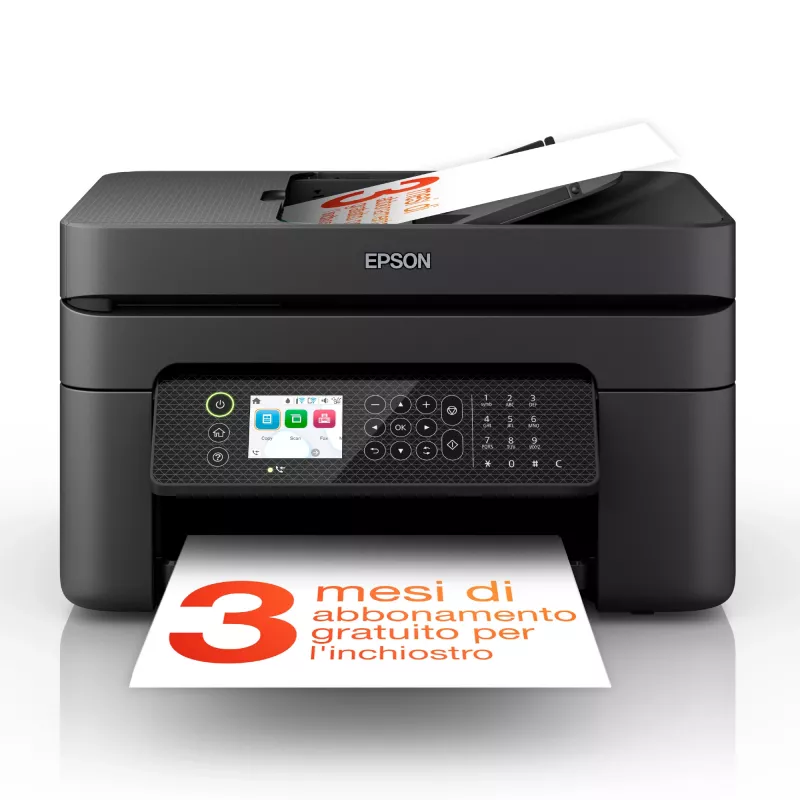
Epson WorkForce WF-2950DWF atramentová A4 5760 x 1440 DPI 33 ppm Wi-Fi

Epson WorkForce WF-2950DWF atramentová A4 5760 x 1440 DPI 33 ppm Wi-Fi
115,84 €
The Epson WorkForce WF-2950DWF Inkjet Colour Printing multifunction printer combines colour printing, scanning, copying and faxing in a compact black chassis designed for home and small office environments. It delivers high-resolution output up to 5760 x 1440 DPI for photos and documents, supports a... Čítať viac
Sklad 62 Kód 1431048 Značka EPSON Model C11CK62402 Záruka 2 roky

Doprava a vrátenie tovaru

Predpokladané doručenie utorok, októbra 20
O stave zásielky Vás budeme priebežne informovať prostredníctvom nášho podrobného systému sledovania zásielok
Možnosti platby
Platobná kartaVisaMastercardPayPalApple PayGoogle PayBankový prevod

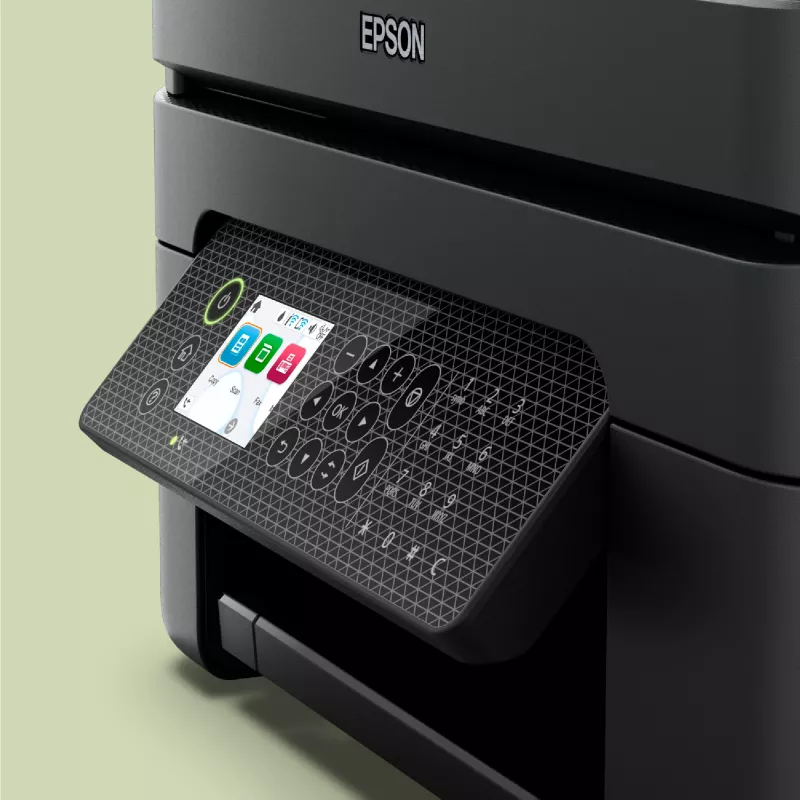
The Epson WorkForce WF-2950DWF Inkjet Colour Printing multifunction printer combines colour printing, scanning, copying and faxing in a compact black chassis designed for home and small office environments. It delivers high-resolution output up to 5760 x 1440 DPI for photos and documents, supports automatic duplex printing to save paper, and offers wireless connectivity for convenient mobile and networked printing. The device balances print quality and everyday performance with a maximum duty cycle suitable for moderate monthly workloads.

Advantages

The printer produces high-detail colour prints and photos thanks to a maximum resolution of 5760 x 1440 DPI, while colour scanning at an optical resolution of 1200 x 2400 DPI captures fine detail for digitising documents. Automatic duplex printing reduces paper use and supports two-sided document workflows. Integrated Wi‑Fi enables printing from smartphones and tablets without cables, and the multifunction design combines scanning, copying and faxing into a single unit to save space. The unit’s lightweight construction aids installation and repositioning within a workspace.

Suitable for

  • Home offices and small businesses requiring colour prints, scans and copies
  • Users who need duplex printing for two-sided documents
  • Mobile printing from smartphones and tablets via Wi‑Fi
  • Occasional faxing alongside everyday printing tasks

Key specifications

  • Print technology: Inkjet colour printing
  • Maximum print resolution: 5760 x 1440 DPI
  • Print speed: up to 18 pages per minute (colour, normal quality) and up to 33 pages per minute (black, normal quality, A4/US Letter)
  • Scanning: colour scanning with optical resolution up to 1200 x 2400 DPI
  • Copying: colour copying capability
  • Duplex: automatic double‑sided printing
  • Connectivity: Wi‑Fi enabled for wireless printing (no Ethernet LAN)
  • Maximum paper size: A4
  • Maximum duty cycle: up to 3000 pages per month
  • Weight: approximately 5.3 kg
  • Product colour: black

How to use

Place the printer on a stable, level surface near a power outlet and within Wi‑Fi range of your router or mobile device. Install the ink cartridges and load A4 paper into the input tray according to the user guide. Connect the printer to your wireless network using the control panel setup or the included software, then install the drivers on your computer or mobile device. Use the scan and copy functions from the control panel or the scanning software; send and receive faxes using the dedicated fax settings. For double‑sided printing, select duplex print in the printer settings before sending a print job.

Recommendations

For consistent print quality and reliable operation, use manufacturer‑recommended ink cartridges and paper types within the supported weight range. Perform regular cleaning cycles and occasional alignment from the printer maintenance menu to maintain scanning and printing accuracy. Limit monthly usage to levels aligned with the device’s maximum duty cycle to prolong component life.

Hlavné vlastnosti
  • Home offices and small businesses requiring colour prints, scans and copies
  • Users who need duplex printing for two-sided documents
  • Mobile printing from smartphones and tablets via Wi‑Fi
  • Occasional faxing alongside everyday printing tasks
  • Print technology: Inkjet colour printing
  • Maximum print resolution: 5760 x 1440 DPI
  • Print speed: up to 18 pages per minute (colour, normal quality) and up to 33 pages per minute (black, normal quality, A4/US Letter)
  • Scanning: colour scanning with optical resolution up to 1200 x 2400 DPI
  • Copying: colour copying capability
  • Duplex: automatic double‑sided printing
  • Connectivity: Wi‑Fi enabled for wireless printing (no Ethernet LAN)
  • Maximum paper size: A4
  • Maximum duty cycle: up to 3000 pages per month
  • Weight: approximately 5.3 kg
  • Product colour: black
Parametre
Automatický podávač dokumentov (ADF)
No
Bezpečnostné algoritmy
64-bit WEP, 128-bit WEP, WPA-PSK, WPA-TKIP, WPA2-AES, WPA2-PSK, WPA3-SAE
Celková vstupná kapacita
100 sheets
Celkový počet vstupných zásobníkov
1
Ethernet LAN
No
Farba produktu
Black
Farby tlače
Black, Cyan, Magenta, Yellow
Farebný displej
Yes
Faxovanie
Colour faxing
Formáty fotografického papiera
10x15,13x18 cm
Formáty ISO radu A (A0...A9)
A4, A5, A6
Formáty ISO radu B (B0...B9)
B5, B6
Formáty obálok
10, C6, DL
Gramáž média v zásobníku papiera
64 - 300 g/m²
Hĺbka
300 mm
Hmotnosť
5.3 kg
Kopírovanie
Colour copying
Maximálne rozlíšenie
5760 x 1440 DPI
Maximálny formát papiera ISO radu A
A4
Maximálny pracovný cyklus
3000 pages per month
Obojstranná tlač
Yes
Obojstranné funkcie
Print
Pamäť faxu
100 pages
Počet portov USB 2.0
1
Počet tlačových kaziet
4
Podporované operačné systémy Mac
Mac OS X 10.10 Yosemite, Mac OS X 10.11 El Capitan, Mac OS X 10.12 Sierra, Mac OS X 10.13 High Sierra, Mac OS X 10.14 Mojave, Mac OS X 10.15 Catalina, Mac OS X 10.15.3 Catalina, Mac OS X 10.2 Jaguar, Mac OS X 10.3 Panther, Mac OS X 10.4 Tiger, Mac OS X 10.5 Leopard, Mac OS X 10.6 Snow Leopard, Mac OS X 10.7 Lion, Mac OS X 10.8 Mountain Lion, Mac OS X 10.9 Mavericks, Mac OS X 11.0 Big Sur, Mac OS X 12.0 Monterey
Podporované operačné systémy Windows
Windows 10, Windows 11, Windows 7, Windows 8, Windows Vista, Windows XP
Podporované serverové operačné systémy
Windows Server 2003, Windows Server 2008 R2, Windows Server 2012 R2, Windows Server 2012 x64, Windows Server 2016
Režim obojstrannej tlače
Auto
Rozlíšenie optického skenovania
1200 x 2400 DPI
Rýchle vytáčanie
Yes
Rýchlosť modemu
33.6 Kbit/s
Rýchlosť prenosu faxu
3 sec/page
Rýchlosť tlače (čierna, normálna kvalita, A4/US Letter)
33 ppm
Rýchlosť tlače (farebná, normálna kvalita, A4/US Letter)
18 ppm
Šírka
375 mm
Skenovanie
Colour scanning
Spotreba energie (kopírovanie)
12 W
Spotreba energie (pohotovostný režim)
4.6 W
Spotreba energie (spánok)
0.7 W
Spotreba energie (vypnuté)
0.2 W
Štandardy Wi-Fi
802.11b, 802.11g, Wi-Fi 4 (802.11n)
Technológia skenovania
CIS
Technológia tlače
Inkjet
Technológie mobilnej tlače
Apple AirPrint, Epson Connect, Epson Email Print, Epson Remote Print, Epson Scan to Cloud, Epson iPrint, Mopria Print Service
Tlač
Colour printing
Tlač bez okrajov
Yes
Typ skenera
ADF scanner
Typy médií v zásobníku papiera
Envelopes, Photo paper, Plain paper
Umiestnenie na trhu
Business
USB port
Yes
Vstavaný displej
Yes
Vstupná frekvencia AC
50 - 60 Hz
Vstupná kapacita automatického podávača dokumentov (ADF)
30 sheets
Vstupné napätie AC
100 - 240 V
Výška
218 mm
Wi-Fi
Yes
Vývoj ceny za posledných 6 mesiacov
Epson WorkForce WF-2950DWF atramentová A4 5760 x 1440 DPI 33 ppm Wi-Fi
Aktuálna
115,84 €
Najnižšia
114,92 €
Najvyššia
116,51 €
Zmena za 24 h
+0,92 €   +1%
Týždeň
-0,67 €   -1%
Mesiac
-0,50 €   0%

Nezávislé recenzie technických médií

rtings.comOlivier
6/10

“The Epson WorkForce WF-2950 is an all-in-one inkjet printer intended for small offices. It replaces the Epson WorkForce WF-2850 but remains very similar in design, with only minor changes beneath the skin.”

Výhody
  • Has flatbed scanner and ADF
  • Decent range of connection options
  • Good printed document quality
Nevýhody
  • Slow printing speed
  • Low page yields
  • Somewhat cheap build quality
Prečítajte si celú recenziu na rtings.com →

Populárne produkty v tejto kategórii

Dobrý deň, som AI asistent DistriNode. Pomôžem Vám nájsť produkty, porovnať možnosti, vytvoriť cenovú ponuku v PDF alebo otvoriť požiadavku na podporu.