
Účet Kontakt
Váš košík
Doručenie cez DPD a FedEx
Pomoc? Opýtajte sa AI

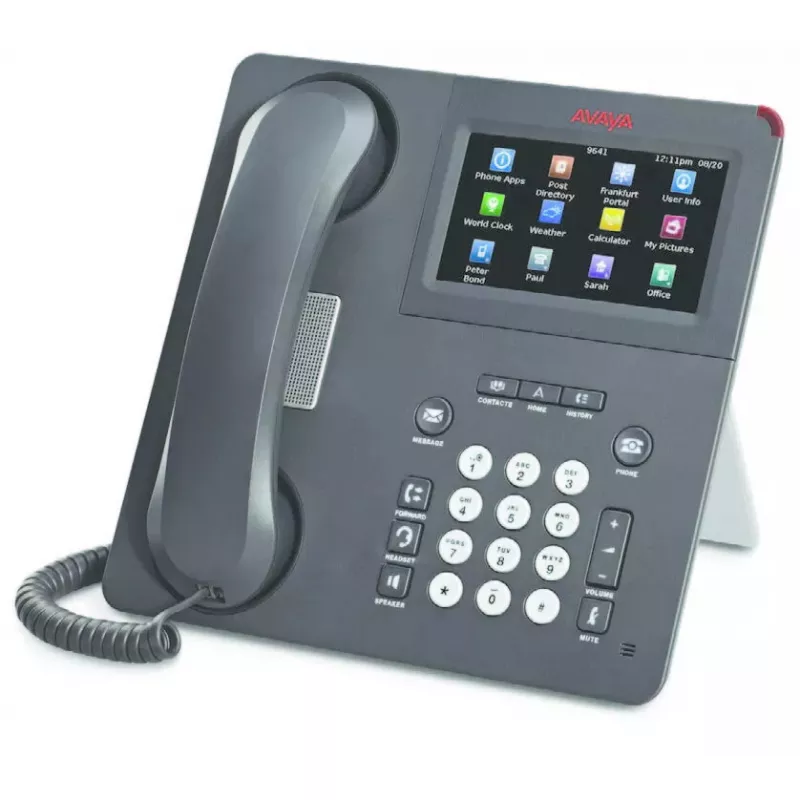
Avaya 9650C stolný telefón IP telefón Charcoal 2 linky LCD

Avaya 9650C stolný telefón IP telefón Charcoal 2 linky LCD
98,41 €
The Avaya 9650C IP Deskphone in charcoal is a two-line VoIP deskphone designed for office use. It offers a clear LCD display, speakerphone, Bluetooth support and Ethernet LAN with Power over Ethernet (PoE). Compatible with Avaya Aura® and, for most models in the 9600 family, Avaya IP Office (note: s... Čítať viac
Sklad 45 Kód 2572796 Značka AVAYA Model 700461213 Záruka 2 roky

Doprava a vrátenie tovaru

Predpokladané doručenie utorok, októbra 27
O stave zásielky Vás budeme priebežne informovať prostredníctvom nášho podrobného systému sledovania zásielok
Možnosti platby
Platobná kartaVisaMastercardPayPalApple PayGoogle PayBankový prevod

The Avaya 9650C IP Deskphone in charcoal is a two-line VoIP deskphone designed for office use. It offers a clear LCD display, speakerphone, Bluetooth support and Ethernet LAN with Power over Ethernet (PoE). Compatible with Avaya Aura® and, for most models in the 9600 family, Avaya IP Office (note: some models such as 9670G and 9601 are not compatible), the 9650C provides reliable audio and a compact interface suited to everyday voice communications.

Advantages

The Avaya 9650C delivers good audio quality and low power consumption thanks to PoE support. Its two-line LCD display and context-aware interface simplify call handling, while built-in speakerphone and Bluetooth increase flexibility for hands-free and accessory connections. The unit’s charcoal finish and compact size make it suitable for standard workstations where a straightforward, dependable IP phone is required.

Suitable for

  • Office desktops and reception desks
  • Small and medium business environments using Avaya Aura®
  • Workplaces needing a compact two-line IP phone with speakerphone and Bluetooth

Key specifications

  • Display: LCD
  • Lines: 2 lines
  • Speakerphone: Yes
  • Ethernet LAN: Yes
  • Bluetooth: Yes
  • Power: Power over Ethernet (PoE)
  • Colour: Charcoal
  • Protocols: H.323 and SIP

How to use

Connect the Avaya 9650C to your LAN using an Ethernet cable; if your network supports PoE the phone will receive power through the same cable. Configure call accounts using the phone’s LCD interface or through your Avaya Aura® (or compatible IP Office) provisioning system. Use the handset, speakerphone or a Bluetooth headset for calls, and adjust volume via the phone’s digital controls. Follow your system administrator’s instructions for SIP or H.323 account setup and network parameters.

Recommendations

For optimal operation, install the Avaya 9650C on a network with sufficient bandwidth and QoS configured for VoIP. Use PoE for simplified cabling and ensure firmware is kept up to date according to Avaya’s release notes.
Hlavné vlastnosti
  • Office desktops and reception desks
  • Small and medium business environments using Avaya Aura®
  • Workplaces needing a compact two-line IP phone with speakerphone and Bluetooth
  • Display: LCD
  • Lines: 2 lines
  • Speakerphone: Yes
  • Ethernet LAN: Yes
  • Bluetooth: Yes
  • Power: Power over Ethernet (PoE)
  • Colour: Charcoal
  • Protocols: H.323 and SIP
Parametre
Bluetooth
Yes
Displej
LCD
Ethernet LAN
Yes
Farba produktu
Charcoal
Hands-free
Yes
Konferenčný hovor
Yes
Počet klávesov klávesnice
28
Počet liniek
2 lines
Počet portov USB 1.1
1
Podpora rozširujúcich modulov
Yes
Podporované sieťové protokoly
H.323+ SIP
Porty Ethernet LAN (RJ-45)
1
Power over Ethernet (PoE)
Yes
Regulácia hlasitosti
Digital
Typ produktu
IP Phone
Výstupy na slúchadlá
1
Vývoj ceny za posledných 6 mesiacov
Avaya 9650C stolný telefón IP telefón Charcoal 2 linky LCD
Aktuálna
98,41 €
Najnižšia
97,48 €
Najvyššia
98,84 €
Zmena za 24 h
+0,92 €   +1%
Týždeň
-0,43 €   0%
Mesiac
-0,28 €   0%

Populárne produkty v tejto kategórii

Dobrý deň, som AI asistent DistriNode. Pomôžem Vám nájsť produkty, porovnať možnosti, vytvoriť cenovú ponuku v PDF alebo otvoriť požiadavku na podporu.