
Účet Kontakt
Váš košík
Doručenie cez DPD a FedEx
Pomoc? Opýtajte sa AI

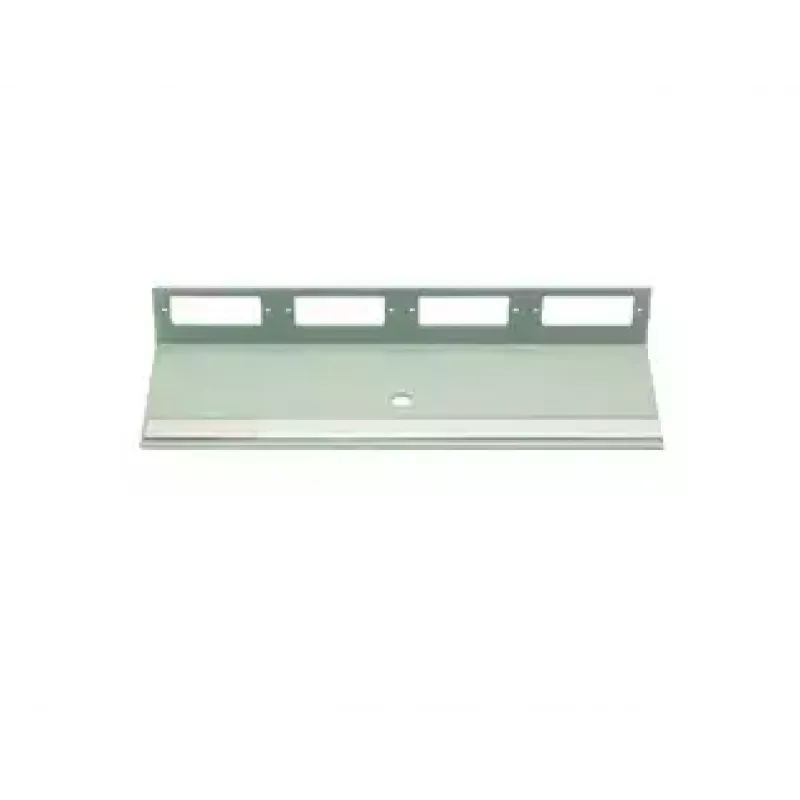
Príslušenstvo k patch panelu Telegärtner H02025A0286 rack montáž SC sivá

Príslušenstvo k patch panelu Telegärtner H02025A0286 rack montáž SC sivá
29,40 €
The Telegärtner H02025A0286 Rack mounting SC Grey is an accessory designed to integrate SC-fiber connections into standard 19-inch rack environments. It provides a compact panel module that holds SC connectors securely while maintaining a uniform rack appearance in a neutral grey finish. The compone... Čítať viac
Sklad 6 Kód 2566763 Značka TELEGÄRTNER Model H02025A0286 Záruka 2 roky

Doprava a vrátenie tovaru

Predpokladané doručenie piatok, októbra 23
O stave zásielky Vás budeme priebežne informovať prostredníctvom nášho podrobného systému sledovania zásielok
Možnosti platby
Platobná kartaVisaMastercardPayPalApple PayGoogle PayBankový prevod

The Telegärtner H02025A0286 Rack mounting SC Grey is an accessory designed to integrate SC-fiber connections into standard 19-inch rack environments. It provides a compact panel module that holds SC connectors securely while maintaining a uniform rack appearance in a neutral grey finish. The component is intended for professional network cabinets and patch installations where orderly fiber termination and straightforward access are required.

Advantages

This rack-mount SC accessory offers a stable mounting solution for SC fiber connections, reducing strain on cables and connectors. Its compact design supports efficient space utilization in racks and enclosures. The neutral grey finish ensures compatibility with typical networking equipment aesthetics, and the construction is optimized for repeated plugging and routing in maintenance scenarios.

Suitable for

  • Organizing SC fiber connections in 19-inch racks
  • Telecommunication and data center fiber patching
  • Network cabinets in office and server-room installations
  • Fiber management points requiring secure connector mounting

Key specifications

  • Connector type: SC fiber interface
  • Mounting: 19-inch rack compatible panel module
  • Color: grey
  • Form factor: compact panel accessory for multiple connector mounting
  • Intended use: passive fiber cable termination and patching

How to use

Install the accessory into a compatible rack bay using standard rack screws and alignment points. Route fiber cables to the rear of the module and terminate with SC connectors, ensuring proper polishing and ferrule alignment where required. Once connectors are seated, secure cable strain relief and route excess fiber to minimize bend radii. Verify connection integrity with appropriate optical test equipment before placing the cabinet back into service.

Recommendations

Use appropriate ESD and fiber-handling precautions during installation. Maintain recommended minimum bend radii for optical fibers, secure cables to avoid mechanical stress on connectors, and keep dust caps on unused ports until they are needed. Periodic inspection and cleaning of connector endfaces will help maintain low insertion loss and reliable performance.

Hlavné vlastnosti
  • Organizing SC fiber connections in 19-inch racks
  • Telecommunication and data center fiber patching
  • Network cabinets in office and server-room installations
  • Fiber management points requiring secure connector mounting
  • Connector type: SC fiber interface
  • Mounting: 19-inch rack compatible panel module
  • Color: grey
  • Form factor: compact panel accessory for multiple connector mounting
  • Intended use: passive fiber cable termination and patching
Parametre
Farba produktu
Grey
Káblové pripojenie
SC
Modulárne
Yes
Montáž
Rack mounting
Počet portov
6
Vývoj ceny za posledných 6 mesiacov
Príslušenstvo k patch panelu Telegärtner H02025A0286 rack montáž SC sivá
Aktuálna
29,40 €
Najnižšia
28,84 €
Najvyššia
43,29 €
Zmena za 24 h
+0,49 €   +2%
Týždeň
+0,54 €   +2%
Mesiac
-12,50 €   -30%
Dobrý deň, som AI asistent DistriNode. Pomôžem Vám nájsť produkty, porovnať možnosti, vytvoriť cenovú ponuku v PDF alebo otvoriť požiadavku na podporu.