
Účet Kontakt
Váš košík
Doručenie cez DPD a FedEx
Pomoc? Opýtajte sa AI

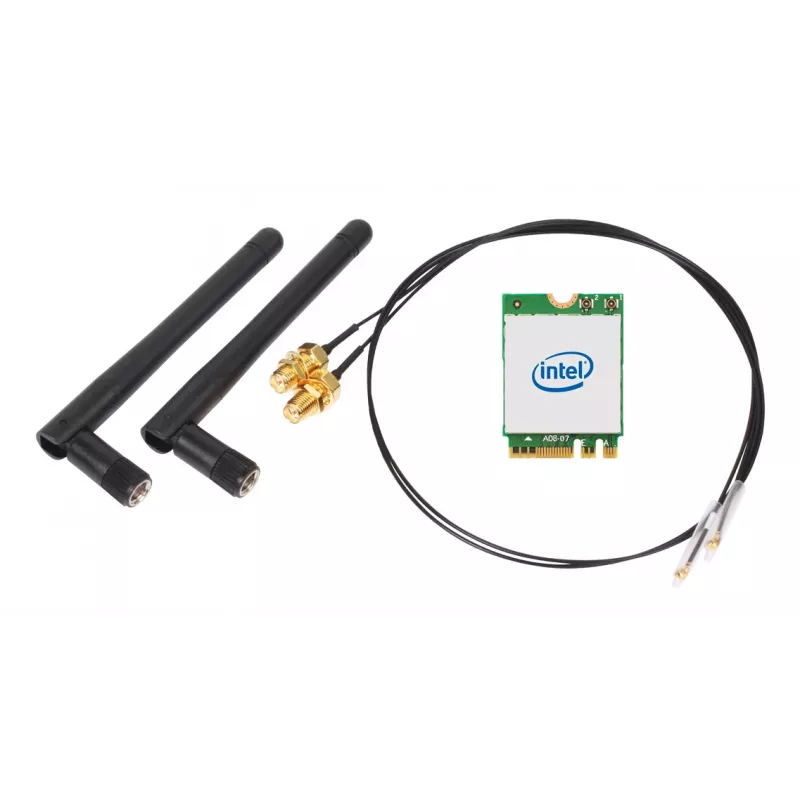
SHUTTLE WLN-M22 WLAN sada — Intel AX210 M.2 Wi‑Fi 6E (Triband 2.4/5/6 GHz) s Bluetooth 5.2 a 2x2 externými anténami

SHUTTLE WLN-M22 WLAN sada — Intel AX210 M.2 Wi‑Fi 6E (Triband 2.4/5/6 GHz) s Bluetooth 5.2 a 2x2 externými anténami
50,18 €
SHUTTLE WLN-M22 is a WLAN/Bluetooth combo kit that includes an Intel AX210 M.2-2230 card, antenna cables and two external 2x2 antennas for improved reception in small form-factor and Cube-style PCs. The module supports tri-band Wi‑Fi 6E (2.4 / 5 / 6 GHz) with theoretical throughput up to 2400 Mbit/s... Čítať viac
Sklad 2 Kód 1732420 Značka SHUTTLE Model WLN-M22 Záruka 2 roky

Doprava a vrátenie tovaru

Predpokladané doručenie utorok, októbra 27
O stave zásielky Vás budeme priebežne informovať prostredníctvom nášho podrobného systému sledovania zásielok
Možnosti platby
Platobná kartaVisaMastercardPayPalApple PayGoogle PayBankový prevod

SHUTTLE WLN-M22 is a WLAN/Bluetooth combo kit that includes an Intel AX210 M.2-2230 card, antenna cables and two external 2x2 antennas for improved reception in small form-factor and Cube-style PCs. The module supports tri-band Wi‑Fi 6E (2.4 / 5 / 6 GHz) with theoretical throughput up to 2400 Mbit/s and integrates Bluetooth 5.2, providing a compact internal upgrade path for systems with an M.2 slot.

Advantages

The WLN-M22 provides tri-band Wi‑Fi 6E capability, enabling access to the new 6 GHz band where available and offering reduced interference in congested environments. With Intel AX210 technology and support for 2x2 spatial streams, the kit combines high wireless data rates up to 2400 Mbit/s and modern Bluetooth 5.2 connectivity in a single M.2 card. The included external antennas and cables improve signal reception for Cube PCs and other small enclosures where internal antenna placement is limited.

Suitable for

When it may not be suitable

This kit requires an available M.2-2230 slot with the appropriate keying and internal antenna routing; it is not a USB or PCIe adapter. Systems without an M.2 socket or without BIOS support for WLAN modules may not accept the card. Maximum performance depends on router/access point capabilities and environmental factors; if the network infrastructure does not support Wi‑Fi 6E or 2x2 operation, you will not achieve the higher throughput values.

Key specifications

How to use

Install the Intel AX210 M.2-2230 card into an available M.2 slot on the motherboard following the system manufacturer’s instructions and securing the card with the appropriate screw. Route and connect the included antenna cables to the card’s antenna connectors, then position the external antennas for optimal reception outside or on the chassis where signal is strongest. After hardware installation, boot the system, install any required drivers from the system vendor or Intel if not provided by the operating system, and configure wireless networks and Bluetooth pairing through the OS network and Bluetooth settings.

What to consider before purchase

Recommendations

For best results, place the external antennas clear of large metal objects and orient them to reduce obstructions; ensure your access point supports 802.11ax and 6 GHz for top speeds. Keep drivers updated and follow Shuttle’s installation guidance for Cube systems to avoid compatibility issues.

Hlavné vlastnosti
  • Upgrading a compact PC or Shuttle XPC Cube with internal M.2 (2230) slot to Wi‑Fi 6E and Bluetooth 5.2
  • Users who need tri-band wireless (2.4 / 5 / 6 GHz) to avoid congestion and use 6 GHz-capable networks
  • Small form-factor systems that require external antennas for better reception
  • Applications needing reliable local wireless throughput for streaming, conferencing or file transfer up to the module’s supported speeds
  • Wireless standard: Wi‑Fi 6E (IEEE 802.11ax) — tri-band (2.4 GHz / 5 GHz / 6 GHz)
  • Maximum data rate: up to 2400 Mbit/s (combined theoretical throughput for supported bands)
  • Form factor: M.2 2230 internal card
  • Spatial streams / antenna configuration: 2x2
  • Bluetooth version: Bluetooth 5.2
  • Included accessories: two external antennas and antenna cables (approx. 53 cm)
  • Intended use: internal WLAN/Bluetooth upgrade for small form-factor and Cube PCs
  • Confirm your PC has an M.2 2230 slot that supports WLAN cards and that BIOS allows wireless modules
  • Check whether your router or access point supports Wi‑Fi 6E (6 GHz) to use the 6 GHz band
  • Ensure physical space and antenna routing in your chassis suit external antenna installation
  • Verify operating system driver availability for the Intel AX210 on your platform
Parametre
Anténa
Yes
Bluetooth
Yes
Dizajn antény
External
Hĺbka
22 mm
Interné
Yes
Kód harmonizovaného systému (HS)
85177900
Komponent pre
PC
Maximálna rýchlosť prenosu dát
2400 Mbit/s
Najvyšší štandard Wi-Fi
Wi-Fi 6E (802.11ax)
Podporované operačné systémy Linux
Yes
Podporované operačné systémy Windows
Windows 10, Windows 11
Prevádzková teplota (T-T)
0 - 80 °C
Rozhranie
WLAN / Bluetooth
Rozhranie hostiteľa
M.2
Sieťové štandardy
IEEE 802.11b, IEEE 802.11g, IEEE 802.11n, IEEE 802.11ax, IEEE 802.11ac
Šírka
30 mm
Štandardy Wi-Fi
802.11b, 802.11g, Wi-Fi 4 (802.11n), Wi-Fi 5 (802.11ac), Wi-Fi 6E (802.11ax)
Stručný návod na inštaláciu
Yes
Technológia pripojenia
Wireless
Typ antény
2x2
Typ smerovania antény
Omni-directional
Verzia Bluetooth
5.2
Výška
2.4 mm
Wi-Fi
Yes
Wi-Fi pásmo
Tri-band (2.4 GHz / 5 GHz / 6 GHz)
Vývoj ceny za posledných 6 mesiacov
SHUTTLE WLN-M22 WLAN sada — Intel AX210 M.2 Wi‑Fi 6E (Triband 2.4/5/6 GHz) s Bluetooth 5.2 a 2x2 externými anténami
Aktuálna
50,18 €
Najnižšia
48,54 €
Najvyššia
50,73 €
Zmena za 24 h
+1,08 €   +2%
Týždeň
+0,56 €   +1%
Mesiac
+0,57 €   +1%

Populárne produkty v tejto kategórii

Predajca: UAB KUR LT · Laisvės pr. 125A, LT-06118 Vilnius, Litva · IČO 303192950 · IČ DPH LT100008198612 · Odoslanie z EÚ (Litva)
Dobrý deň, som AI asistent DistriNode. Pomôžem Vám nájsť produkty, porovnať možnosti, vytvoriť cenovú ponuku v PDF alebo otvoriť požiadavku na podporu.