
Účet Kontakt
Váš košík
Doručenie cez DPD a FedEx
Pomoc? Opýtajte sa AI

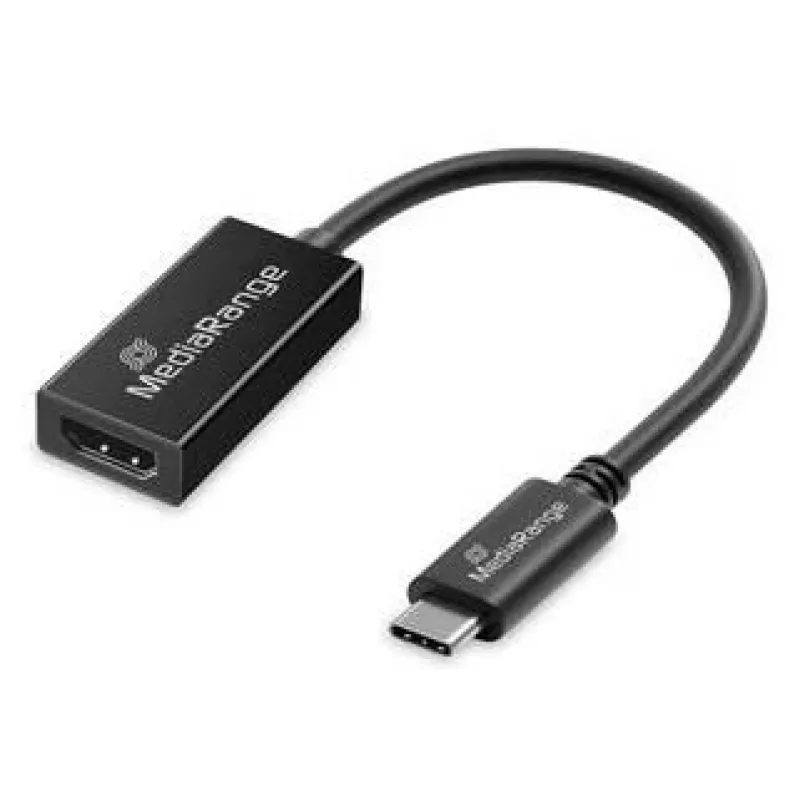
USB Type-C na HDMI audio a video konvertor MediaRange MRCS234, 20 cm, čierny

USB Type-C na HDMI audio a video konvertor MediaRange MRCS234, 20 cm, čierny
18,35 €
The MediaRange USB Type-C to HDMI Audio and Video Converter MRCS234 is a compact 20 cm adapter that converts a USB-C video/audio output to an HDMI display input. It carries both video and audio, supports Full HD resolution at 60 Hz, and is designed for quick, driverless connection between modern lap... Čítať viac
Sklad 101 Kód 1718150 Značka MEDIARANGE Model MRCS234 Záruka 2 roky

Doprava a vrátenie tovaru

Predpokladané doručenie pondelok, októbra 26
O stave zásielky Vás budeme priebežne informovať prostredníctvom nášho podrobného systému sledovania zásielok
Možnosti platby
Platobná kartaVisaMastercardPayPalApple PayGoogle PayBankový prevod

The MediaRange USB Type-C to HDMI Audio and Video Converter MRCS234 is a compact 20 cm adapter that converts a USB-C video/audio output to an HDMI display input. It carries both video and audio, supports Full HD resolution at 60 Hz, and is designed for quick, driverless connection between modern laptops, tablets or smartphones with USB-C and HDMI-equipped monitors, TVs or projectors. The adapter is black, lightweight and intended for straightforward use in presentations, media playback and screen mirroring.

Advantages

This adapter provides stable transmission of video and integrated audio with support for crisp 1920 x 1080 @ 60 Hz playback. The plug & play design requires no drivers on Windows, macOS or Android systems, allowing immediate setup. Its compact 20 cm cable and lightweight construction make it easy to carry and position near devices, and gold-plated contacts improve contact reliability and signal quality.

Suitable for

  • Connecting USB-C laptops, tablets or smartphones to HDMI monitors or TVs for presentations
  • Streaming video and audio from a USB-C device to an external display for home entertainment
  • Screen mirroring for meetings, classrooms or on-the-go demonstrations
  • Temporary connections to projectors in meeting rooms or conference venues

When it may not be suitable

This converter supports up to Full HD (1920 x 1080) at 60 Hz and therefore is not suitable if you require 4K or higher resolution output. It is designed for straightforward signal conversion and does not include additional features such as Ethernet passthrough, USB data ports, or power delivery for charging the host device.

Key specifications

  • Cable length: 0.2 m
  • Input connector: USB Type-C (straight male)
  • Output connector: HDMI (female)
  • Supported resolution: up to 1920 x 1080 @ 60 Hz
  • Data bandwidth: up to 5 Gbit/s
  • Color: Black
  • Weight: approximately 15 g
  • Suitable for Plug & Play use with Windows, macOS and Android

How to use

Connect the USB Type-C plug of the MRCS234 adapter to the USB-C video output on your laptop, tablet or smartphone. Plug an HDMI cable from the adapter’s HDMI female port to the HDMI input on your monitor, TV or projector. Select the HDMI input on the display and, if needed, enable external display or screen mirroring on the source device. No driver installation is required for most modern operating systems; video and audio should transfer automatically once the connection is established.

What to consider before purchase

  • Check whether your source device’s USB-C port supports video output (DisplayPort Alt Mode)
  • Confirm that Full HD (1920 x 1080) resolution meets your display requirements
  • Plan for an external HDMI cable between the adapter and display if not included
  • Note that the adapter does not provide device charging or additional USB ports

Recommendations

For best results, use a high-quality HDMI cable and ensure the source device’s video output is enabled. Keep the adapter in a ventilated area and avoid tight bends near the connector to preserve cable integrity. If the display does not detect the signal, try reconnecting the adapter and restarting the source device.

Hlavné vlastnosti
  • Connecting USB-C laptops, tablets or smartphones to HDMI monitors or TVs for presentations
  • Streaming video and audio from a USB-C device to an external display for home entertainment
  • Screen mirroring for meetings, classrooms or on-the-go demonstrations
  • Temporary connections to projectors in meeting rooms or conference venues
  • Cable length: 0.2 m
  • Input connector: USB Type-C (straight male)
  • Output connector: HDMI (female)
  • Supported resolution: up to 1920 x 1080 @ 60 Hz
  • Data bandwidth: up to 5 Gbit/s
  • Color: Black
  • Weight: approximately 15 g
  • Suitable for Plug & Play use with Windows, macOS and Android
  • Check whether your source device’s USB-C port supports video output (DisplayPort Alt Mode)
  • Confirm that Full HD (1920 x 1080) resolution meets your display requirements
  • Plan for an external HDMI cable between the adapter and display if not included
  • Note that the adapter does not provide device charging or additional USB ports
Parametre
Ďalšie podporované operačné systémy
Android
Dĺžka kábla
0.2 m
Farba produktu
Black
Formát konektora 1
Straight
Formát konektora 2
Straight
Hĺbka
45 mm
Hmotnosť
0.015 kg
Konektor 1
USB Type-C
Konektor 2
HDMI
Maximálna obnovovacia frekvencia
60 Hz
Maximálne rozlíšenie
1920 x 1080
Množstvo v balení
1 pc(s)
Plug and Play
Yes
Podporované operačné systémy Mac
Y
Podporované operačné systémy Windows
Y
Pohlavie konektora 1
Male
Pohlavie konektora 2
Female
Pokovovanie kontaktov konektora
Gold
Prenosová rýchlosť
5 Gbit/s
Šírka
20 mm
Typ balenia
Hanging box
Veľkosť vodiča AWG
32
Výška
10 mm
Vývoj ceny za posledných 6 mesiacov
USB Type-C na HDMI audio a video konvertor MediaRange MRCS234, 20 cm, čierny
Aktuálna
18,35 €
Najnižšia
17,73 €
Najvyššia
22,55 €
Zmena za 24 h
+0,62 €   +4%
Týždeň
+0,60 €   +3%
Mesiac
—   

Populárne produkty v tejto kategórii

Dobrý deň, som AI asistent DistriNode. Pomôžem Vám nájsť produkty, porovnať možnosti, vytvoriť cenovú ponuku v PDF alebo otvoriť požiadavku na podporu.