
Účet Kontakt
Váš košík
Doručenie cez DPD a FedEx
Pomoc? Opýtajte sa AI

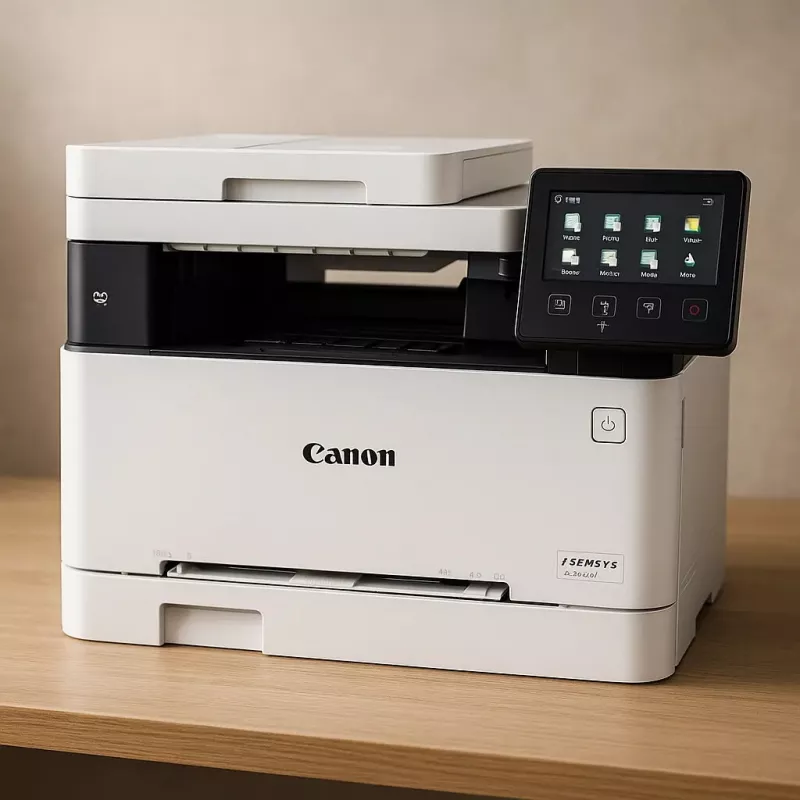
Canon i-SENSYS MF651CW laser A4 1200 x 1200 DPI 18 ppm Wi-Fi

Canon i-SENSYS MF651CW laser A4 1200 x 1200 DPI 18 ppm Wi-Fi
894,26 €
The Canon i-SENSYS MF651CW Multifunction Device delivers laser colour printing with a maximum resolution of 1200 x 1200 DPI. This multifunctional printer supports A4 paper and provides colour copying and colour scanning with optical resolution up to 600 x 600 DPI. With print speeds up to 18 ppm (bla... Čítať viac
Sklad 5 Kód 338278 Značka Canon Model 5158C009 Záruka 2 roky

Doprava a vrátenie tovaru

Predpokladané doručenie pondelok, októbra 26
O stave zásielky Vás budeme priebežne informovať prostredníctvom nášho podrobného systému sledovania zásielok
Možnosti platby
Platobná kartaVisaMastercardPayPalApple PayGoogle PayBankový prevod

The Canon i-SENSYS MF651CW Multifunction Device delivers laser colour printing with a maximum resolution of 1200 x 1200 DPI. This multifunctional printer supports A4 paper and provides colour copying and colour scanning with optical resolution up to 600 x 600 DPI. With print speeds up to 18 ppm (black, normal quality) and built-in Wi‑Fi and Ethernet LAN connectivity, the MF651CW is designed to integrate into small office or home office environments. Compact dimensions and dual-tone product colour options (black, white) make it suitable for typical workspace layouts.

Advantages

The Canon i-SENSYS MF651CW uses laser print technology to produce sharp colour and monochrome output at a maximum resolution of 1200 x 1200. It combines printing, copying and scanning functions in a single unit, reducing the need for separate devices while supporting a maximum monthly duty cycle of up to 30,000 pages. Networked connectivity via Wi‑Fi and Ethernet LAN enables direct printing from computers and mobile devices. The device’s 18.9 kg weight and A4 paper handling balance portability and robust construction for office use.

Suitable for

  • Small offices and home offices requiring colour printing, copying and scanning
  • Workgroups needing networked printing over Wi‑Fi or Ethernet
  • Users who require A4 document handling with up to 1200 x 1200 DPI output
  • Environments with moderate monthly print volumes (up to 30,000 pages)

Key specifications

  • Brand: Canon; Model: i-SENSYS MF651CW; MPN: 5158C009AA
  • Print technology: Laser; Printing: Colour printing
  • Print speed (black, A4, normal): 18 ppm
  • Maximum print resolution: 1200 x 1200 DPI
  • Copying: Colour copying; Maximum copy resolution: 600 x 600
  • Scanning: Colour scanning; Optical scanning resolution: 600 x 600
  • Maximum paper size: A4; Product colour: Black, White
  • Connectivity: Wi‑Fi, Ethernet LAN
  • Weight: 18.9 kg; Maximum duty cycle: 30,000 pages per month

How to use

Place the Canon i-SENSYS MF651CW on a stable surface and connect it to power. Install the supplied toner cartridges and load A4 paper in the input tray. Connect the device to your network using Wi‑Fi or Ethernet LAN; follow the on-screen or manual instructions to configure network settings and install the appropriate drivers on your computer or mobile device. For printing, select the MF651CW in your printer list and choose desired print quality and colour settings. For copying and scanning, use the control panel to set resolution (up to 600 x 600 for scanning/copying) and other job parameters, then start the job from the panel or via the network scan utility.

Recommendations

To maintain print quality and device longevity, use compatible Canon consumables, perform routine cleaning as described in the user manual, and operate within the recommended monthly duty cycle. For reliable network printing, ensure stable Wi‑Fi signal or use Ethernet LAN for high-volume tasks.

Hlavné vlastnosti
  • Small offices and home offices requiring colour printing, copying and scanning
  • Workgroups needing networked printing over Wi‑Fi or Ethernet
  • Users who require A4 document handling with up to 1200 x 1200 DPI output
  • Environments with moderate monthly print volumes (up to 30,000 pages)
  • Brand: Canon; Model: i-SENSYS MF651CW; MPN: 5158C009AA
  • Print technology: Laser; Printing: Colour printing
  • Print speed (black, A4, normal): 18 ppm
  • Maximum print resolution: 1200 x 1200 DPI
  • Copying: Colour copying; Maximum copy resolution: 600 x 600
  • Scanning: Colour scanning; Optical scanning resolution: 600 x 600
  • Maximum paper size: A4; Product colour: Black, White
  • Connectivity: Wi‑Fi, Ethernet LAN
  • Weight: 18.9 kg; Maximum duty cycle: 30,000 pages per month
Parametre
Bezpečnostné algoritmy
64-bit WEP, 128-bit WEP, WPA-PSK, WPA-TKIP, WPA2-AES, WPA2-PSK
Čas do prvej strany (čierna, normálna)
10.4 s
Čas do prvej strany (farebná, normálna)
10.5 s
Celková vstupná kapacita
250 sheets
Celková výstupná kapacita
100 sheets
Celkový počet vstupných zásobníkov
1
Displej
LCD
Doba zohriatia
13 s
Ethernet LAN
Yes
Farba produktu
Black, White
Farby tlače
Black, Cyan, Magenta, Yellow
Farebný displej
Yes
Faxovanie
No
Formáty ISO radu A (A0...A9)
A4, A5
Formáty ISO radu B (B0...B9)
B5
Formáty obálok
C5, Com-10, DL, Monarch
Formáty tlačových médií mimo ISO
Executive, Legal, Letter, Oficio, Statement
Frekvencia procesora
800 MHz
Funkcia kopírovania preukazov
Yes
Gramáž média v zásobníku papiera
60 - 163 g/m²
Hĺbka
460 mm
Hmotnosť
18.9 kg
Interná pamäť
1024 MB
Jazyky popisu stránky
UFRII
Kopírovanie
Colour copying
Maximálna vstupná kapacita
251 sheets
Maximálne rozlíšenie
1200 x 1200 DPI
Maximálne rozlíšenie kopírovania
600 x 600 DPI
Maximálny formát papiera ISO radu A
A4
Maximálny počet kópií
999 copies
Maximálny pracovný cyklus
30000 pages per month
Odporúčaný pracovný cyklus
250 - 2500 pages per month
Ovládače skenera
ICA, TWAIN, WIA
Podporované formáty dokumentov
PDF
Podporované formáty obrázkov
JPEG, PNG, TIFF
Podporované operačné systémy Mac
Mac OS X 10.11 El Capitan, Mac OS X 10.12 Sierra, Mac OS X 10.13 High Sierra, Mac OS X 10.14 Mojave, Mac OS X 10.15 Catalina, Mac OS X 10.15.3 Catalina, Mac OS X 10.2 Jaguar, Mac OS X 10.3 Panther, Mac OS X 10.4 Tiger, Mac OS X 10.5 Leopard, Mac OS X 10.6 Snow Leopard, Mac OS X 10.7 Lion, Mac OS X 10.8 Mountain Lion, Mac OS X 10.9 Mavericks, Mac OS X 11.0 Big Sur, Mac OS X 12.0 Monterey
Podporované operačné systémy Windows
Windows 10, Windows 11, Windows 8.1
Podporované serverové operačné systémy
Windows Server 2022
Prevádzková teplota (T-T)
10 - 30 °C
Priama tlač
Yes
Protokoly správy
SNMPv1, SNMPv3 (IPv4,IPv6)
Relatívna vlhkosť pri prevádzke (H-H)
20 - 80%
Rozlíšenie optického skenovania
600 x 600 DPI
Rýchlosť tlače (čierna, normálna kvalita, A4/US Letter)
18 ppm
Rýchlosti Ethernet LAN
10,100,1000 Mbit/s
Šírka
451 mm
Skenovanie
Colour scanning
Skenovať do
Cloud, E-mail, FTP, PC, USB
Spotreba energie (max.)
850 W
Spotreba energie (spánok)
0.8 W
Spotreba energie (standby)
11 W
Spotreba energie (tlač)
370 W
Štandardy Wi-Fi
802.11b, 802.11g, Wi-Fi 4 (802.11n)
Technológia tlače
Laser
Tlač
Colour printing
Typ ovládania
Touch
Typ skenera
Flatbed scanner
Typy médií v zásobníku papiera
Coated paper, Envelopes, Heavy paper, Labels, Plain paper, Postcard, Recycled paper, Thin paper
Umiestnenie na trhu
Business
Univerzálny zásobník
Yes
Úrovne odtieňov sivej
256
USB port
Yes
Vstavaný displej
Yes
Vstavaný procesor
Yes
Vstupná farebná hĺbka
24 bit
Vstupná frekvencia AC
50 - 60 Hz
Vstupné napätie AC
220 - 240 V
Výška
360 mm
Výstupná farebná hĺbka
24 bit
Wi-Fi
Yes
Zabezpečená tlač
Yes
Zmena veľkosti pri kopírovaní
25 - 400%
Vývoj ceny za posledných 6 mesiacov
Canon i-SENSYS MF651CW laser A4 1200 x 1200 DPI 18 ppm Wi-Fi
Aktuálna
894,26 €
Najnižšia
851,81 €
Najvyššia
894,26 €
Zmena za 24 h
+41,31 €   +5%
Týždeň
+33,78 €   +4%
Mesiac
+38,61 €   +5%

Populárne produkty v tejto kategórii

Predajca: UAB KUR LT · Laisvės pr. 125A, LT-06118 Vilnius, Litva · IČO 303192950 · IČ DPH LT100008198612 · Odoslanie z EÚ (Litva)
Messenger
Dobrý deň, som AI asistent DistriNode. Pomôžem Vám nájsť produkty, porovnať možnosti, vytvoriť cenovú ponuku v PDF alebo otvoriť požiadavku na podporu.